Are we running out of context now?
Narration
Listen or continue with the transcriptNarration
Listen or continue with the transcriptTranscript
One question that comes up a lot is: "Can you create a website or package with pre-created documentation, linter rules, and everything in one place that you can just copy-paste?" Well, you're actually describing a plugin.
Anthropic has created a fantastic ecosystem around this. There's a developer named Jesse who writes brilliant plugins. For example, there's a networking debugger skill that walks through trace routes and helps you diagnose network issues. There's also the web app testing skill that uses Playwright to interact with and test local web applications.
You could create your own private GitHub repository for organization-specific plugins. This can define skills, slash commands, and all these kinds of project-specific tools that you want to have available.
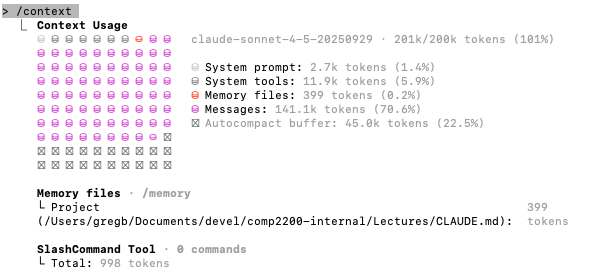
Now, let's talk about context limits. You can use the /context command to see how full your context window is. If you're running low on space, there are several strategies. You can use /export to save your current conversation, /copy to capture the last answer or a useful code block, /recap to get a short session summary before you step away, /compact to compress the context, or /clear to start fresh with project memory still available.
The key is being aware of your context usage as you work. For larger codebases, you'll need to be strategic about what files you load and when.