How full is your context?
Narration
Listen or continue with the transcriptNarration
Listen or continue with the transcriptTranscript
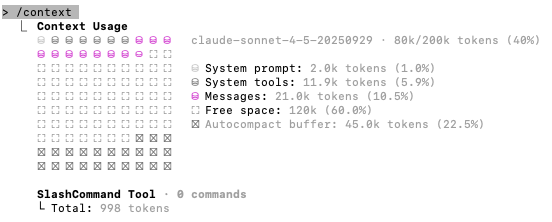
One important thing to keep an eye on is how full your context window is. Claude has a limited context window, and when it gets full, performance can degrade.
In the Claude Code interface, you'll see a visual indicator showing your context usage. If your context looks light - maybe just a small portion filled - you don't have a problem at all. In fact, you can push Claude much harder. You can add more information to your CLAUDE.md file, work on larger files, tackle bigger projects.
But if you see your context getting full, that's when you need to start thinking about context management. You might want to start a new conversation, use the memory feature more strategically, or break your work into smaller chunks.
The key is being aware of your context usage. A light context means Claude has plenty of room to think, to hold information about your project, and to work effectively. A full context means it's time to clean up or start fresh.